Editor
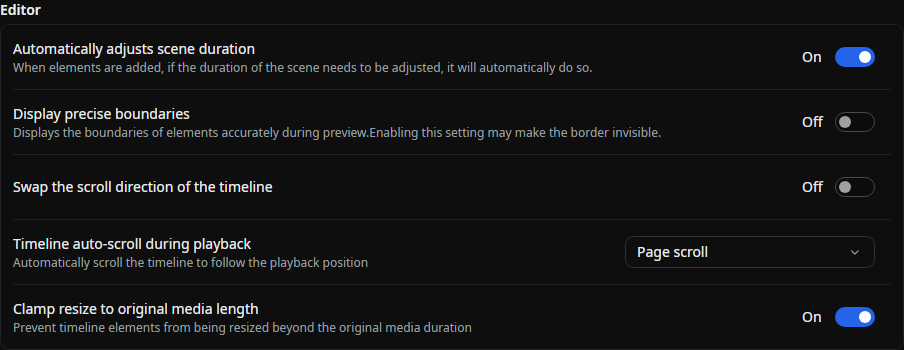
Automatically Adjust Scene Length
When enabled, the scene length will be automatically adjusted when an element is added if necessary.
Auto-Save
Edits are saved automatically after changes are committed. Auto-save is always enabled; the former Enable Auto-Save switch has been removed.
See Editing Elements for how Beutl protects element files that could not be fully restored.
Show Precise Boundaries
When enabled, the boundaries displayed during the preview will be shown precisely.
For objects like rectangles, the boundary lines might overlap with the drawing content, making the boundaries invisible.
Frame Cache
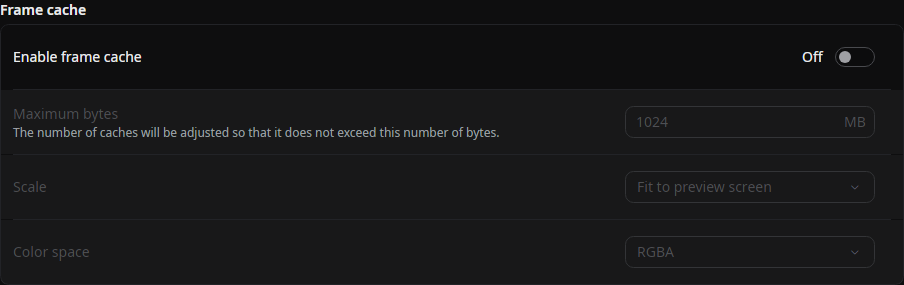
Enable Frame Cache
When enabled, frame caching is activated.
The default setting is "Off".
Maximum Byte Size
Adjust the cache size to not exceed this byte size (in megabytes).
The default value is half of the memory available to the .NET runtime. This follows a container or job memory limit when one is configured, rather than always using the device's physical memory.
Scale
When saving the cache to memory, use this setting to reduce resolution to save memory.
- Original
- Match preview screen (default value)
- Half
- Quarter
If the preview screen size is equal to or larger than the original size, the resolution remains unchanged.
Color Space
When saving the cache to memory, use this setting to change the color space to save memory.
- RGBA (default value)
- YUV
YUV uses I420.
Node Cache
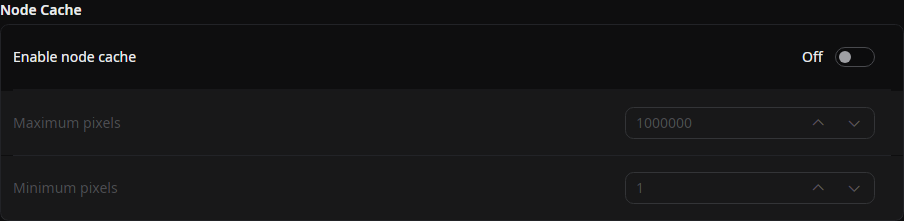
Enable Node Cache
When enabled, node caching is activated.
The default setting is "Off".
Maximum Pixel Count
Nodes exceeding this pixel count will not be cached.
The default value is "1000000".
Minimum Pixel Count
Nodes below this pixel count will not be cached.
The default value is "1".
Proxy Media
These settings control the proxy media workflow.
Preview Source
Controls whether the preview uses proxy media.
- Prefer proxy (default value)
- Force original
Store Location
Proxy files are stored in this folder.
The default location is the proxies folder in Beutl's home directory. A change takes effect after Beutl restarts.
Maximum Store Size
When the store exceeds this size (in GiB), Beutl removes the least-recently-used proxies.
The default value is "50" GiB (allowed range: 5–500). A change takes effect after Beutl restarts.
Default Preset
Sets the quality preset initially selected in the Proxies tool tab.
- Half proxy (1/2)
- Quarter proxy (1/4) (default value)
- Eighth proxy (1/8)
Property Editor

Enable Pointer Lock
Locks the cursor and hides it during drag operations in the property editor (Windows only).
The default setting is "On".