Creating a C# Project for Extensions
This article explains how to create an empty C# project for Beutl extensions.
This guide introduces the methods using Visual Studio Code or Visual Studio.
The target Beutl version is 1.1.0.
Visual Studio Code
- Use the terminal to create a class library.
dotnet new classlib -o MyBeutlExtension
Ensure the directory structure is as follows:
MyBeutlExtension
┣━ obj
┃  ┗━ (...)
┣━ Class1.cs
┗━ MyBeutlExtension.csproj
- Edit the generated
MyBeutlExtension.csprojas follows:
<Project Sdk="Microsoft.NET.Sdk">
  <PropertyGroup>
    <!-- Change the TargetFramework according to the Beutl version -->
    <TargetFramework>net10.0</TargetFramework>
    <ImplicitUsings>enable</ImplicitUsings>
    <Nullable>enable</Nullable>

    <!-- The following are optional. -->
    <RepositoryUrl>url/to/repository</RepositoryUrl>
    <PackageId>MyBeutlExtension</PackageId>
    <Title>Sample Extension</Title>
    <Description>Sample</Description>
    <PackageTags>sample</PackageTags>
    <Version>1.0.0</Version>
    <AssemblyVersion>1.0.0.0</AssemblyVersion>
    <Authors>Author Name</Authors>
  </PropertyGroup>

  <!-- Ensure the build is recognized as a sideload extension. -->
  <PropertyGroup Condition="'$(Configuration)'=='Debug'">
    <AppendTargetFrameworkToOutputPath>false</AppendTargetFrameworkToOutputPath>
    <AppendRuntimeIdentifierToOutputPath>false</AppendRuntimeIdentifierToOutputPath>
    <EnableDynamicLoading>true</EnableDynamicLoading>
    <OutputPath>$([System.Environment]::GetFolderPath(SpecialFolder.UserProfile))\.beutl\sideloads\$(AssemblyName)</OutputPath>
  </PropertyGroup>

  <ItemGroup>
    <PackageReference Include="Beutl.Extensibility" Version="1.1.0" />
    <PackageReference Include="Beutl.ProjectSystem" Version="1.1.0" />
    <PackageReference Include="Beutl.Operators" Version="1.1.0" />
  </ItemGroup>

</Project>
- Run the following commands to generate
nuget.configand add the package source.
dotnet new nugetconfig
dotnet nuget add source "https://nuget.beditor.net/v3/index.json" --name nuget.beditor.net
This completes the creation of an empty C# project for extensions.
Visual Studio
-
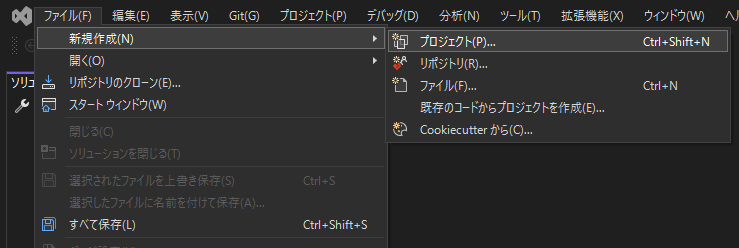
Open Visual Studio and click File > New > Project.
-
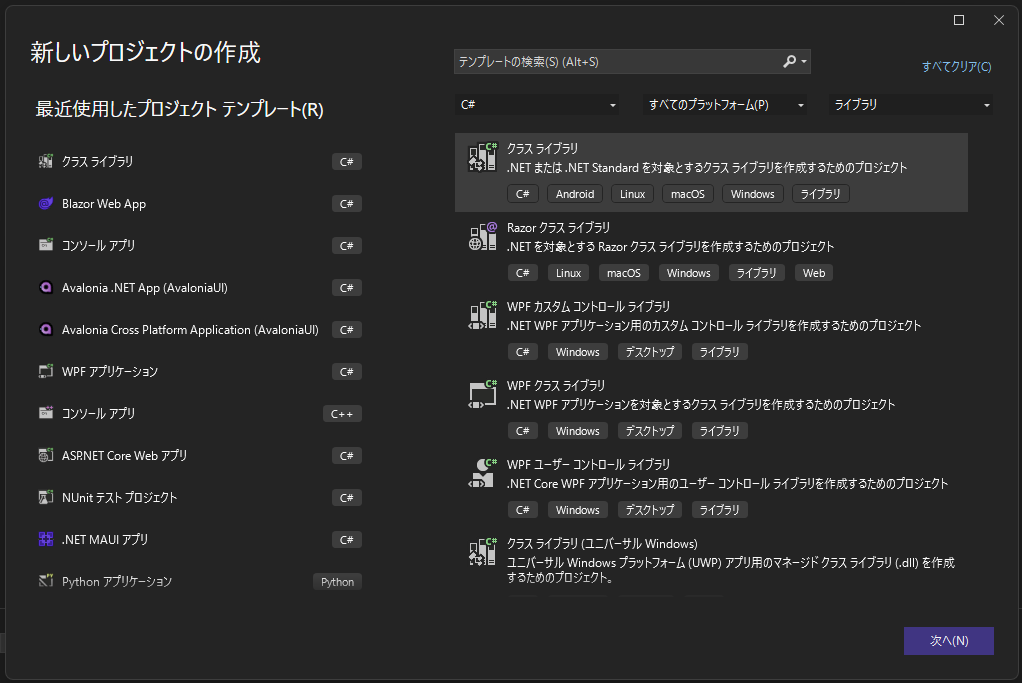
Select Class Library and click Next.
-
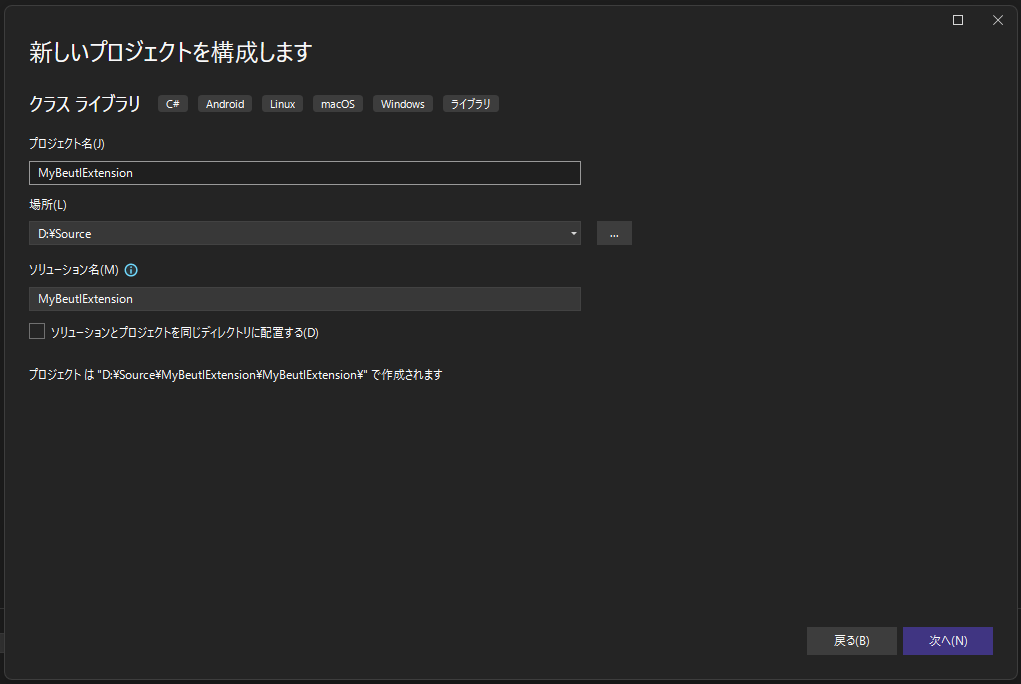
Enter the project name and location, then click Next.
-
Select the framework according to the Beutl version.
-
Click Create.
Ensure the directory structure is as follows:
MyBeutlExtension
┣━ MyBeutlExtension
┃  ┣━ obj
┃  ┃  ┗━ (...)
┃  ┣━ Class1.cs
┃  ┗━ MyBeutlExtension.csproj
┗━ MyBeutlExtension.sln
- Edit the generated
MyBeutlExtension.csprojas follows:
<Project Sdk="Microsoft.NET.Sdk">
  <PropertyGroup>
    <!-- Change the TargetFramework according to the Beutl version -->
    <TargetFramework>net10.0</TargetFramework>
    <ImplicitUsings>enable</ImplicitUsings>
    <Nullable>enable</Nullable>

    <!-- The following are optional. -->
    <RepositoryUrl>url/to/repository</RepositoryUrl>
    <PackageId>MyBeutlExtension</PackageId>
    <Title>Sample Extension</Title>
    <Description>Sample</Description>
    <PackageTags>sample</PackageTags>
    <Version>1.0.0</Version>
    <AssemblyVersion>1.0.0.0</AssemblyVersion>
    <Authors>Author Name</Authors>
  </PropertyGroup>

  <!-- Ensure the build is recognized as a sideload extension. -->
  <PropertyGroup Condition="'$(Configuration)'=='Debug'">
    <AppendTargetFrameworkToOutputPath>false</AppendTargetFrameworkToOutputPath>
    <AppendRuntimeIdentifierToOutputPath>false</AppendRuntimeIdentifierToOutputPath>
    <EnableDynamicLoading>true</EnableDynamicLoading>
    <OutputPath>$([System.Environment]::GetFolderPath(SpecialFolder.UserProfile))\.beutl\sideloads\$(AssemblyName)</OutputPath>
  </PropertyGroup>

  <ItemGroup>
    <PackageReference Include="Beutl.Extensibility" Version="1.1.0" />
    <PackageReference Include="Beutl.ProjectSystem" Version="1.1.0" />
    <PackageReference Include="Beutl.Operators" Version="1.1.0" />
  </ItemGroup>

</Project>
- Run the following commands to generate
nuget.configand add the package source.
dotnet new nugetconfig
dotnet nuget add source "https://nuget.beditor.net/v3/index.json" --name nuget.beditor.net
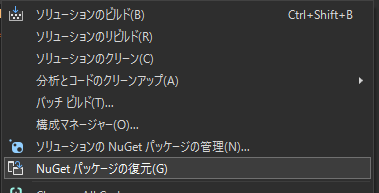
- Click Restore NuGet Packages to ensure that NuGet dependencies are restored correctly.
This completes the creation of an empty C# project for extensions.